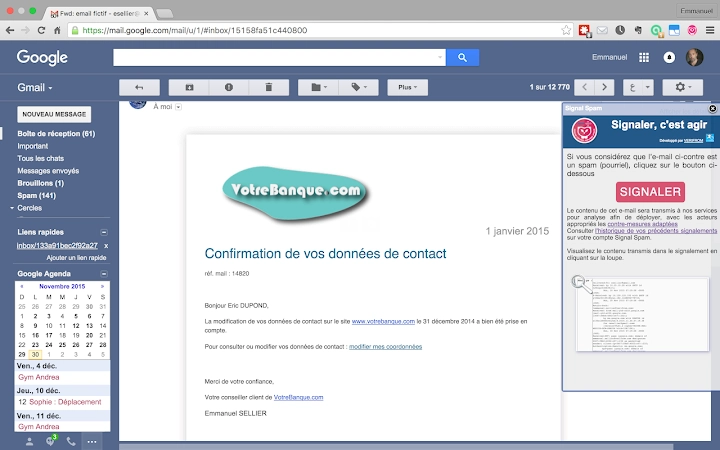

Report Spam Instantly with Signal Spam
Overview
Signal Spam is a desktop and browser-based tool designed to empower users in the fight against spam and phishing threats. By enabling direct reporting of suspicious emails and fraudulent websites, the software supports a public-private collaboration model aimed at strengthening digital security. The primary purpose of Signal Spam is to collect actionable intelligence from users and forward it to relevant authorities or professionals for investigation and response. This approach helps identify spammers, track malicious campaigns, and mitigate cyber threats at scale.
The tool is particularly useful for individuals and organizations concerned about email-based fraud, unsolicited marketing, or phishing attempts. It integrates seamlessly into existing email clients and webmail platforms, allowing users to report spam with minimal disruption to their workflow. Real-world use cases include reporting phishing emails from impersonated companies, identifying mass marketing campaigns, or alerting authorities to emerging scam websites. By contributing to a centralized threat intelligence network, users play an active role in enhancing online safety for the broader community.
Developed by Signal Spam, the extension is positioned as a security utility focused on transparency and public engagement. The developer did not provide additional details about the organization’s background or operational structure. However, the tool’s functionality emphasizes user-driven reporting and automated threat detection, making it a valuable addition to personal and organizational cybersecurity practices.
Key Features & Capabilities
- Spam Reporting Integration – Users can report suspicious emails directly from their email client or webmail interface. The tool captures metadata such as sender address, subject line, and headers to support investigation.
- Phishing Protection – The extension alerts users when they access a website previously flagged by Signal Spam as fraudulent or malicious.
- Public-Private Collaboration – Reported data is reviewed by Signal Spam for accuracy and then shared with relevant authorities or cybersecurity professionals for action.
- Automated Threat Intelligence – The system aggregates reports to identify patterns, track spam sources, and detect emerging threats across platforms.
- Real-Time Alerts – Users receive immediate notifications when attempting to interact with known phishing or scam websites.
These features support proactive threat mitigation. For example, a user receiving a fake bank email can report it instantly, triggering an investigation. Similarly, when visiting a suspicious login page, the extension will block access and issue a warning. The tool does not replace antivirus software but complements existing security layers by focusing on user-reported data and centralized analysis.
User Interface, Workflow & Performance
Signal Spam operates primarily as a browser extension, meaning its user interface is integrated into the webmail environment and browser toolbar. The design appears minimal, focusing on functionality over visual complexity. Users are likely prompted to confirm reports with a single click, ensuring a streamlined workflow. Navigation is intuitive, with no additional menus or settings required during regular use.
Workflow efficiency is optimized for speed and ease of use. Reporting spam involves minimal steps—typically a right-click or a button press within the email interface. The extension processes reports in the background, with no visible performance impact during normal browsing. The developer did not specify resource usage details, but based on its 1.2 MB file size and lightweight nature, it is expected to consume minimal CPU and RAM.
Stability is assumed to be consistent with standard browser extensions, though exact performance data was not provided. No reports of crashes, freezes, or conflicts with major browsers were mentioned. Users can expect reliable operation across different webmail platforms, provided the extension is properly installed and enabled.
Compatibility & System Requirements
Signal Spam is compatible with Windows, Mac, and Linux operating systems, making it accessible to a wide range of users across different computing environments. The software is designed as a browser extension, so it functions within supported web browsers such as Chrome, Firefox, and Edge, though specific browser versions were not listed.
The installation size is 1.2 MB, indicating a lightweight footprint that does not strain system resources. This small size suggests efficient code and minimal dependencies. The developer did not provide additional system requirements, such as minimum RAM, processor speed, or disk space. As such, exact compatibility details beyond OS support remain unspecified.
Users should ensure their browser is up to date to maintain full functionality. While the extension is designed for webmail integration, it may not work with all email clients unless they are accessed via a web browser. Offline email clients are not supported by the current implementation.
Pros and Cons
Pros
- Free to use with no hidden costs
- Lightweight design (1.2 MB installation size)
- Real-time phishing alerts improve online safety
- Contributes to a larger anti-spam effort through public-private collaboration
- Simple, intuitive reporting process with minimal user input
Cons
- Only works with webmail and browser-based email clients
- No detailed system requirements provided
- Performance impact on older or low-resource systems not specified
- Does not function offline or in native email applications
- Developer background and organizational structure not disclosed
FAQ Section
Is Signal Spam compatible with all email clients?
Signal Spam is designed to work with webmail services accessed through a browser. It does not support native email clients like Outlook or Thunderbird unless they are accessed via a web interface.
Is the software safe to install?
Yes, the extension is developed by Signal Spam and distributed through official channels. It is free and does not include malware or tracking components beyond what is necessary for spam reporting and phishing protection.
How often does the extension update?
Automatic updates are managed through the browser’s extension store. Users are advised to keep their browser and extension up to date for optimal security and compatibility.
Can I use Signal Spam offline?
No, the extension requires an active internet connection to report spam, verify websites, and receive threat intelligence updates.
What license type does Signal Spam use?
Signal Spam is provided as a free tool under a public service license. The exact terms were not disclosed, but it is intended for public use and non-commercial purposes.
Final Thoughts + CTA
Signal Spam delivers a focused, effective solution for users who want to actively combat spam and phishing threats. Its ability to report suspicious emails and warn against fraudulent websites makes it a valuable tool in personal and organizational cybersecurity strategies. The integration into webmail environments is seamless, and the lightweight design ensures minimal impact on system performance.
While it has limitations—particularly in supporting only browser-based email clients—it fills a critical gap in user-driven threat reporting. By contributing to a centralized intelligence network, users help strengthen the digital ecosystem for everyone. The free model and straightforward functionality make it accessible to a broad audience.
For anyone concerned about online security and looking to take direct action against spam, Signal Spam offers a simple yet powerful way to make a difference. Download Signal Spam now.







